Announcements, App Features, and Editor's Pick -
INTRODUCING, SULIT BUNDLES!

Alam namin ang daily hustle mo. Mula sa pag-asikaso ng orders hanggang sa pag-rely sa “diskarte” para lumago ang negosyo—hindi biro ang maging sariling boss. Pero aminin natin: ang isa sa pinakamalaking sakit sa ulo ng mga online sellers ay ang pabago-bagong shipping rates. Minsan, imbes na mapunta sa profit, nakakain pa ng delivery fee ang kinikita mo.
Dito sa GoGo Xpress, naniniwala kami na ang totoong Boss, hindi hinahayaang mabulsa ng shipping ang kanyang pinaghirapan.
Kaya naman, we are redefining the market. Ngayong April 10, officially launched na ang Sulit Bundles
Ano ang Sulit Bundles?
Sa halagang ₱500, makakakuha ka na ng 10 small pouch deliveries.
- Fixed Price: ₱50 flat rate per delivery. Wala nang hula-hula!
- NCR to NCR: Perfect para sa mga orders within the metro.
- Up to 3kg: Hangga’t kasya sa pouch, ₱50 lang ’yan, Boss!
- Prepaid via GCash: Isang bayaran, 10 bookings na ang secured. Zero drama.
Ito ang “Boss Math”—mas predictable ang gastos, mas malinaw ang profit margin mo.
Handa ka na bang mag-Boss Level?
Huwag nang magpa-iwan sa mahal na shipping fee. Be the Boss of your kita today.
How to Get Your ₱50 Flat Rate Shipping for the Sulit Bundles (10-in-1)
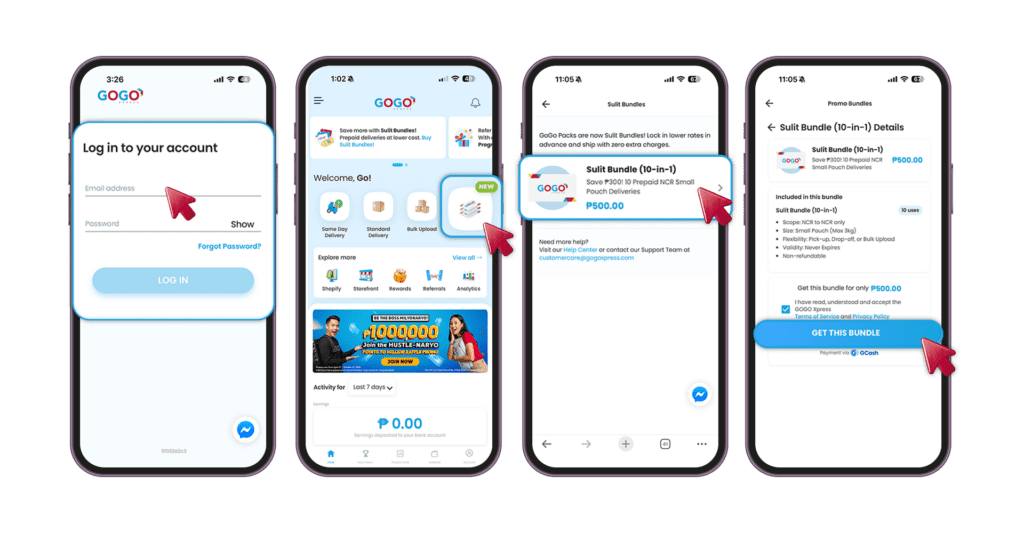
Ready to lock in the cheapest rates in NCR? Follow these steps to claim your Sulit Bundles (10-in-1) and start saving on every ship-out.
Step 1: Access Your Hustle
Open the GoGo Xpress app and log in to your account.
Step 2: Head to ‘Sulit Bundles’ on the Home Page
Right on your main dashboard/Home Page, look for and click the Sulit Bundles icon. No more digging through hidden menus!
Step 3: Secure Sulit Bundles (10-in-1)
Choose the Sulit Bundle (10-in-1) option.
Step 4: Pay Seamlessly via GCash
Finalize your transaction by paying quickly and securely through GCash.
Step 5: Start Shipping
Boom! Your 10 discounted shipping credits are instantly locked into your account. Start using your Sulit Bundle on your upcoming orders.
How to Use Sulit Bundles (10-in-1)
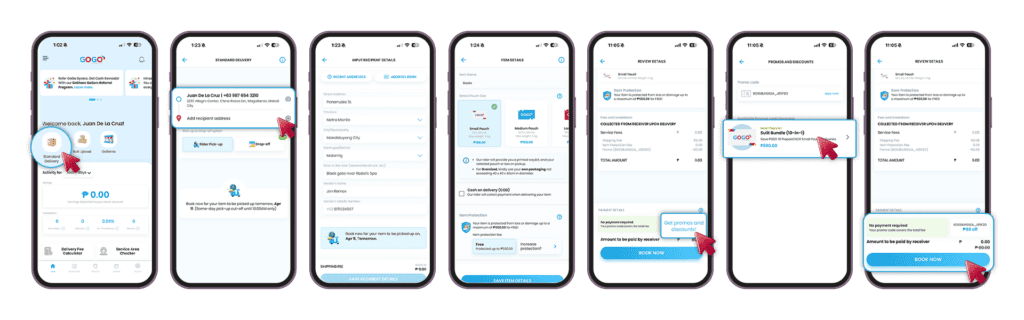
Step 1: Select Standard Delivery:
Open your app dashboard and select the Standard Delivery option.
Step 2: Recipient Information
Fill in the necessary recipient information, including their name, mobile number, and specific location details (City/Municipality and Barangay).
NOTE: Sulit Bundles are only applicable for Metro Manila Deliveries.
Step 3: Package Specifications
Input the item name and select the Small pouch for your shipment.
Step 4: Applying Your Promo
Before finalizing your booking, navigate to the Review Details screen and click on Get Promos and Discount.
Select Your Bundle: Your purchased Sulit Bundles (10-in-1) will be visible in the available promos.
Automatic Application: Select the bundle to apply it; the discount will automatically be deducted from your total amount for that shipment.
